Event Photo Platform — OCR Bib Number Detection System
Full-stack monorepo with dual OCR providers, async BullMQ job processing, S3 storage, and real-time bib number search for race event photography platforms.
The Problem
Race events — marathons, triathlons, cycling races — generate thousands of photos. A single marathon with 10,000 runners and 5 photographers produces roughly 15,000 images. Every participant wants to find photos of themselves quickly, and the fastest way is searching by bib number.
The problem? Someone has to tag every photo with the bib numbers visible in it. Manual tagging at 10 seconds per photo means 40+ hours of labor per event. Humans misread numbers, miss partial bibs, and get fatigued. For event photographers and organizers, this bottleneck means delayed photo delivery and frustrated runners.
The Solution
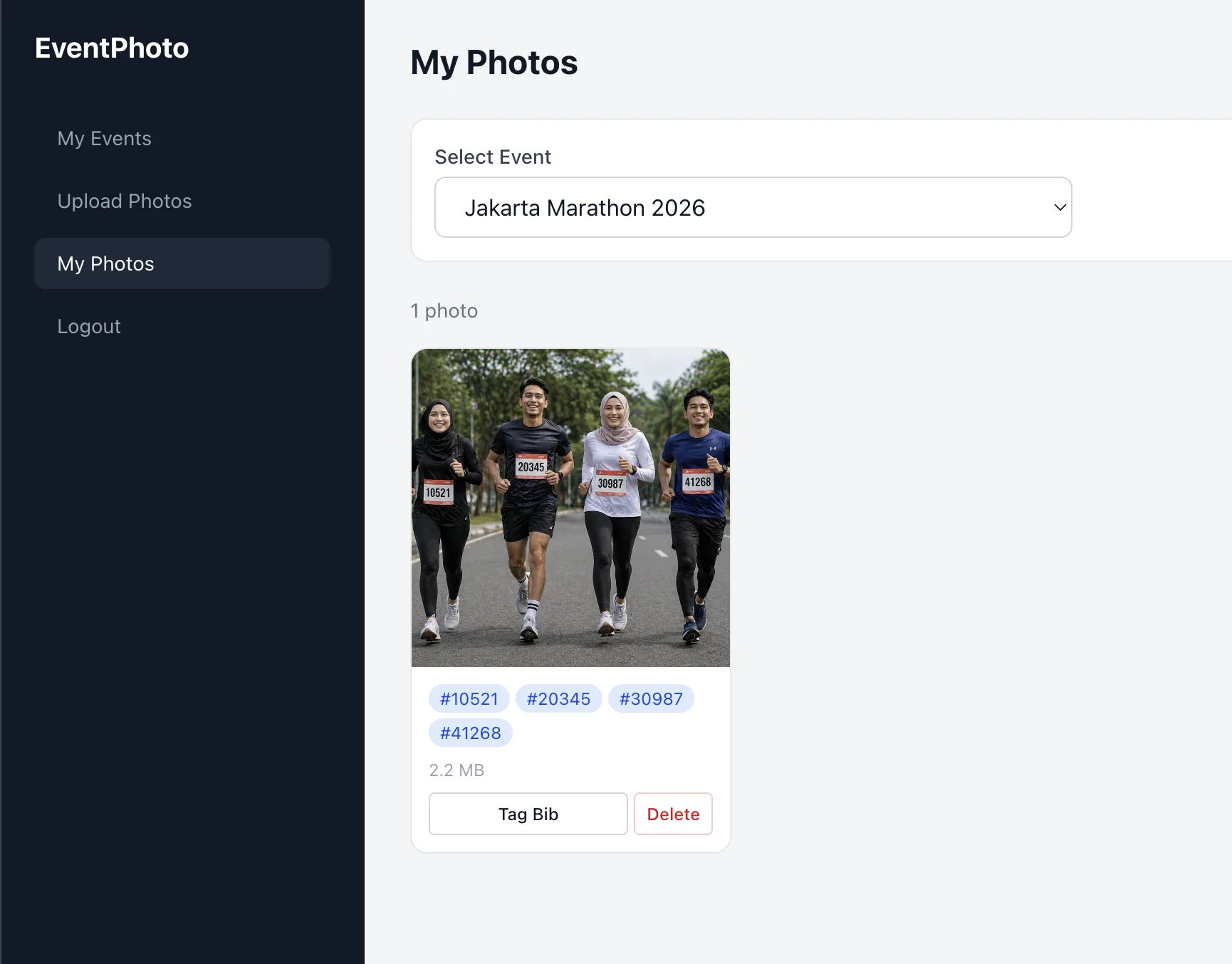
I built a complete Event Photo Platform — a full-stack monorepo that automates the entire workflow. Photographers upload photos through a dashboard, the system detects bib numbers using a dual OCR provider system (Google Cloud Vision for accuracy, Tesseract.js as a free fallback), and participants can search and download their photos instantly through a public-facing web app.
Try the client-side OCR demo — upload any race photo and watch bib detection happen entirely in your browser. For the full platform source, see the event-photo-platform monorepo.
For a deep technical walkthrough of the OCR pipeline, scoring algorithm, and database design, check out my blog post: Race Photo Platform with OCR Bib Detection: Full-Stack Build.
Architecture
The platform follows a monorepo architecture with clear separation between the API server, admin dashboard, and public-facing web app:
event-photo-platform/
├── apps/
│   ├── api/                # Express.js REST API (port 4001)
│   │   └── src/modules/    # Feature-based: auth, events, photos, ocr, search
│   ├── dashboard/          # Next.js admin/photographer portal (port 3002)
│   │   └── src/app/        # Admin pages, photographer upload, settings
│   └── web/                # Next.js public site (port 3000)
│       └── src/app/        # Event browsing, bib search, photo download
├── packages/
│   ├── database/           # Drizzle ORM + PostgreSQL schema + seed
│   ├── types/              # Shared TypeScript types
│   └── utils/              # Shared utilities
├── docker-compose.yml      # PostgreSQL, Redis, MinIO
└── package.json            # Bun workspace monorepo
Why Monorepo?
Shared types between API and both frontends eliminate duplicate interfaces. A single bun install covers all apps. Database schema changes propagate automatically to every consumer.
Why Dual OCR Providers?
Google Cloud Vision gives ~95% accuracy but costs money. Tesseract.js is free and runs locally but achieves ~50% accuracy. The platform lets admins switch between providers from the dashboard — no server restart needed. For the client-side demo, Tesseract.js runs entirely in the browser with no server required.
Why BullMQ + Redis?
OCR processing is CPU-intensive. Running it synchronously would block photo uploads. BullMQ handles queuing, concurrency control (5 workers), automatic retries, and failure logging — keeping the upload response fast while OCR runs in the background.
Key Features
OCR Pipeline
- Dual provider system — Google Cloud Vision (high accuracy) or Tesseract.js (free, local)
- Multi-pass Tesseract strategy — 4 passes per image: raw OCR, preprocessed, digit-only, and torso crop region
- Confidence scoring — Occurrence-based boosting + digit length modifiers + Tesseract confidence blending
- False positive filtering — Year numbers (2020-2027), too-short numbers (under 2 digits), too-long numbers (over 7 digits)
- Async processing — OCR queued via BullMQ, doesn’t block photo uploads
Photo Management
- Single and bulk upload — Up to 500 photos at once with drag-and-drop
- S3-compatible storage — MinIO locally, AWS S3 in production — switch with env vars
- Presigned URLs — Photos served directly from storage, never proxied through API
- Automatic image processing — Sharp generates thumbnails and previews on upload
- Soft delete — Photos marked as deleted, not removed from storage — recoverable
Search & Discovery
- Bib number search — Indexed queries on
(bib_number, photo_id)for fast lookups - Event-scoped search — Search within a specific event or across all events
- Redis caching — Search results cached for 5 minutes
- One-click download — Presigned download URLs with download count tracking
Role-Based Access
- Admin — Full access: manage events, users, settings, all photos
- Event Admin — Manage events, assign photographers, view reports
- Photographer — Upload photos to assigned events, tag bibs, manage own photos
- User — Browse events, search by bib, download photos
Client-Side Demo
- Standalone HTML app — Zero backend, runs entirely in the browser
- Tesseract.js powered — Same OCR engine as the full platform, client-side
- Visual feedback — Highlights detected bib regions with confidence scores
- No image upload — All processing happens locally, privacy-friendly
What I Learned
- OCR is harder than it looks — Bib numbers are small, blurred, rotated, partially hidden. No single OCR configuration catches everything. The multi-pass approach was necessary because each pass catches different edge cases.
- Job queues are essential for image processing — Synchronous OCR would have killed upload performance. BullMQ with Redis made the async pipeline reliable with retries and failure handling.
- S3 presigned URLs are the right pattern — Never proxy large files through your API. Let the storage layer serve them directly. This keeps the API lightweight and scales much better.
- Confidence scoring needs domain knowledge — Generic OCR confidence isn’t enough. Knowing that bibs are 4-5 digits, typically appear on the torso area, and that year numbers on banners are false positives dramatically improved accuracy.
- Monorepos scale well for full-stack projects — Shared types and database schema across apps eliminated entire categories of bugs. Change a column type once, every app gets the update.
More Projects
30 Days Web Challenge — Community-Driven Daily Build Experiment
An interactive web experiment where strangers vote on features to build over 30 days, powered by Next.js with real-time voting, animated UI, and daily progress tracking.
CSSKit — Open-Source CSS Animation Library with 310+ Animations
A free, open-source CSS animation library built with Astro and React. Browse 310+ animations across 11 categories, customize parameters live, and copy-paste into your project. Zero dependencies.
Festival Jamu Nusantara — Event & QR Check-in Platform
Full-stack event platform for Indonesian jamu festival with QR check-in, member points, gallery system, and Filament admin panel. Built with Next.js and Laravel.
Engineering Ladders Picker — Career Level Assessment Tool
A web-based Engineering Ladders assessment tool that helps engineers pick axis levels, compare against reference ladders, and export a clean PDF summary.
More Projects
30 Days Web Challenge — Community-Driven Daily Build Experiment
An interactive web experiment where strangers vote on features to build over 30 days, powered by Next.js with real-time voting, animated UI, and daily progress tracking.
CSSKit — Open-Source CSS Animation Library with 310+ Animations
A free, open-source CSS animation library built with Astro and React. Browse 310+ animations across 11 categories, customize parameters live, and copy-paste into your project. Zero dependencies.
Festival Jamu Nusantara — Event & QR Check-in Platform
Full-stack event platform for Indonesian jamu festival with QR check-in, member points, gallery system, and Filament admin panel. Built with Next.js and Laravel.
Engineering Ladders Picker — Career Level Assessment Tool
A web-based Engineering Ladders assessment tool that helps engineers pick axis levels, compare against reference ladders, and export a clean PDF summary.
Semesa Grande — Residential Community Management App
Full-stack PWA with role-based dashboards, kas payment tracking, audit workflows, asset borrowing, document management, and push notifications for communities.
BSpace — Mining Operations and Workforce Management
Flutter mobile app for BUMA mining operations with offline-first task management, GPS telematics, mission tracking, photo validation, and growth dashboards.
Interested in Something Similar?
Need a similar project built, want to collaborate, or have questions about the tech stack? Drop a comment below or reach out directly.