Semesa Grande — Residential Community Management App
Full-stack PWA with role-based dashboards, kas payment tracking, audit workflows, asset borrowing, document management, and push notifications for communities.
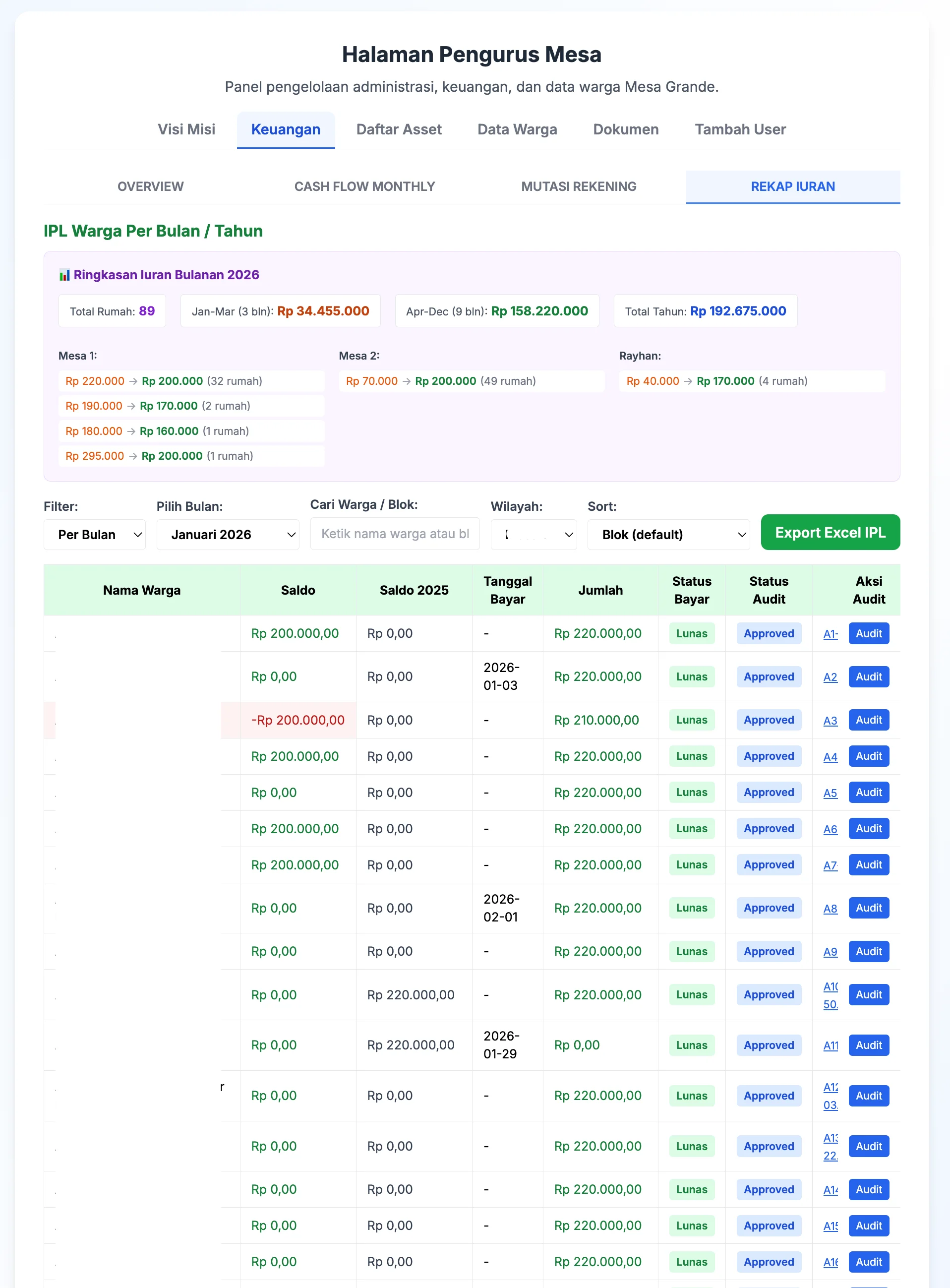
The Problem
Managing a residential community (Paguyuban) with hundreds of residents involves a mountain of repetitive admin work — collecting monthly dues (IPL), tracking who paid and who didn’t, managing community assets, keeping records of meetings and decisions, and communicating with residents. For most communities in Indonesia, this is still done with paper ledgers, WhatsApp groups, and spreadsheets passed around via email.
The pain points are real:
- Payment tracking is manual — The treasurer collects cash/transfers from each household, logs it in a spreadsheet, and manually reconciles at month-end
- No transparency — Residents can’t easily check their own payment status or the community’s financial health
- Asset borrowing is informal — Someone borrows a community tool and there’s no record of who has what
- Document management is scattered — Meeting minutes, financial reports, and community photos live in different people’s phones and laptops
The Solution
Semesa Grande is a progressive web app built specifically for the Mesa Grande residential community. It digitizes the entire community management workflow — from billing and payment collection to asset tracking and document storage — with a clear separation between committee (Pengurus) and resident (Warga) roles.
Check out the live app at semesagrande.web.app — or explore the interactive prototype (same UI/UX, mocked backend, any credentials work) to click through both admin and resident views.
Architecture
The app follows a serverless architecture using Firebase as the backend, keeping infrastructure costs at zero for a community-scale application.
Mesa Grande PWA
├── Frontend (React 19 SPA)
│   ├── Role-based routing (Pengurus / Warga)
│   ├── PWA with service worker + offline support
│   └── FCM push notifications
├── Firebase Backend
│   ├── Authentication (Email/Password + Google OAuth)
│   ├── Firestore (real-time NoSQL database)
│   ├── Cloud Messaging (push notifications)
│   └── Hosting (SSL + CDN)
├── File Storage
│   ├── Google Apps Script → Google Drive (free)
│   └── Auto-naming: blok-YYYY-MM-DD-HH-MM-SS.ext
└── Export Layer
    └── XLSX client-side Excel generation
Why Firebase?
For a community app serving hundreds of users, a traditional server setup is overkill and costly. Firebase provides authentication, real-time database, file hosting, and push notifications — all with generous free tiers. Firestore’s real-time sync means when the treasurer logs a payment, the resident sees it instantly.
Why Google Apps Script for Uploads?
Firebase Storage has quota limits. Google Drive via Apps Script gives unlimited free storage for community documents — meeting minutes, payment receipts, event photos. The upload endpoint is a simple Google Apps Script web app that accepts files and returns a shareable URL.
Key Features
Kas (Treasury) System
- Automated IPL billing — Monthly dues calculated per block type (B1, B7, B12, etc.) with configurable rates that changed from April 2026
- Payment tracking — Per-resident monthly payment status with visual indicators
- Multi-payment support — Record bulk payments for multiple months at once
- Excel export — Download all financial records as
.xlsxfor external reporting
Audit Workflow
- Payment approval process — Payments start as “pending” and require committee approval
- Receipt upload — Upload bukti transfer (transfer receipts) as evidence
- Audit trail — Full history of approvals and rejections with notes
- Monthly balance tracking — Running balance per month for financial transparency
Asset Borrowing
- Asset catalog — Predefined list of community assets (tools, equipment)
- Borrowing request workflow — Submit → Approve → Complete cycle
- Status tracking — Pending, approved, rejected states with date ranges
- Movement history — Full log of who borrowed what and when
Document Management
- File uploads via Google Drive — Free, unlimited storage for community documents
- Organized by category — Resident documents, committee documents, asset docs
- Event documentation — Photo galleries from community events (2024-2026)
- Automatic file naming — Timestamped filenames prevent conflicts
Push Notifications (FCM)
- Payment reminders — Notify residents of upcoming or overdue payments
- Event announcements — Community events and meetings
- System updates — New features and maintenance notices
- Foreground + background handling — Messages delivered in all app states
User Management
- Two-tier roles — Pengurus (full access) and Warga (self-service)
- Password policy — Random-generated initial passwords, forced change on first login
- Google account linking — Optional OAuth for easier future logins
- Profile management — Contact info, block assignment, role type
Public Pages
- Landing page — Community overview with video introduction
- Dokumentasi — Photo gallery from community events
- Paguyuban — Committee structure and block representatives
What I Learned
Building a production app for real users taught me things side projects never could:
- Real users don’t read instructions — The UI had to be self-explanatory. Every confusing flow resulted in a WhatsApp message to me. I learned to design for the least technical user.
- Free infrastructure scales surprisingly well — Firebase free tier + Google Drive storage handles hundreds of users without a single dollar spent on hosting.
- Google Apps Script is underrated — A few lines of Apps Script gave me a free file upload API with unlimited storage. No CORS issues, no authentication complexity, just a POST endpoint.
- Audit trails build trust — When residents can see exactly who approved what and when, complaints about financial management dropped to near zero. Transparency is a feature.
- PWA matters in Indonesia — Many residents access the app exclusively from their phone. The PWA install prompt and offline caching meant they could use it like a native app without visiting an app store.
Learn how I turned this app into a live portfolio demo in my blog post on the Prototype Showcase Pattern — or explore the interactive prototype to click through both admin and resident views yourself.
More Projects
30 Days Web Challenge — Community-Driven Daily Build Experiment
An interactive web experiment where strangers vote on features to build over 30 days, powered by Next.js with real-time voting, animated UI, and daily progress tracking.
CSSKit — Open-Source CSS Animation Library with 310+ Animations
A free, open-source CSS animation library built with Astro and React. Browse 310+ animations across 11 categories, customize parameters live, and copy-paste into your project. Zero dependencies.
Event Photo Platform — OCR Bib Number Detection System
Full-stack monorepo with dual OCR providers, async BullMQ job processing, S3 storage, and real-time bib number search for race event photography platforms.
Festival Jamu Nusantara — Event & QR Check-in Platform
Full-stack event platform for Indonesian jamu festival with QR check-in, member points, gallery system, and Filament admin panel. Built with Next.js and Laravel.
More Projects
30 Days Web Challenge — Community-Driven Daily Build Experiment
An interactive web experiment where strangers vote on features to build over 30 days, powered by Next.js with real-time voting, animated UI, and daily progress tracking.
CSSKit — Open-Source CSS Animation Library with 310+ Animations
A free, open-source CSS animation library built with Astro and React. Browse 310+ animations across 11 categories, customize parameters live, and copy-paste into your project. Zero dependencies.
Event Photo Platform — OCR Bib Number Detection System
Full-stack monorepo with dual OCR providers, async BullMQ job processing, S3 storage, and real-time bib number search for race event photography platforms.
Festival Jamu Nusantara — Event & QR Check-in Platform
Full-stack event platform for Indonesian jamu festival with QR check-in, member points, gallery system, and Filament admin panel. Built with Next.js and Laravel.
Engineering Ladders Picker — Career Level Assessment Tool
A web-based Engineering Ladders assessment tool that helps engineers pick axis levels, compare against reference ladders, and export a clean PDF summary.
BSpace — Mining Operations and Workforce Management
Flutter mobile app for BUMA mining operations with offline-first task management, GPS telematics, mission tracking, photo validation, and growth dashboards.
Interested in Something Similar?
Need a similar project built, want to collaborate, or have questions about the tech stack? Drop a comment below or reach out directly.